

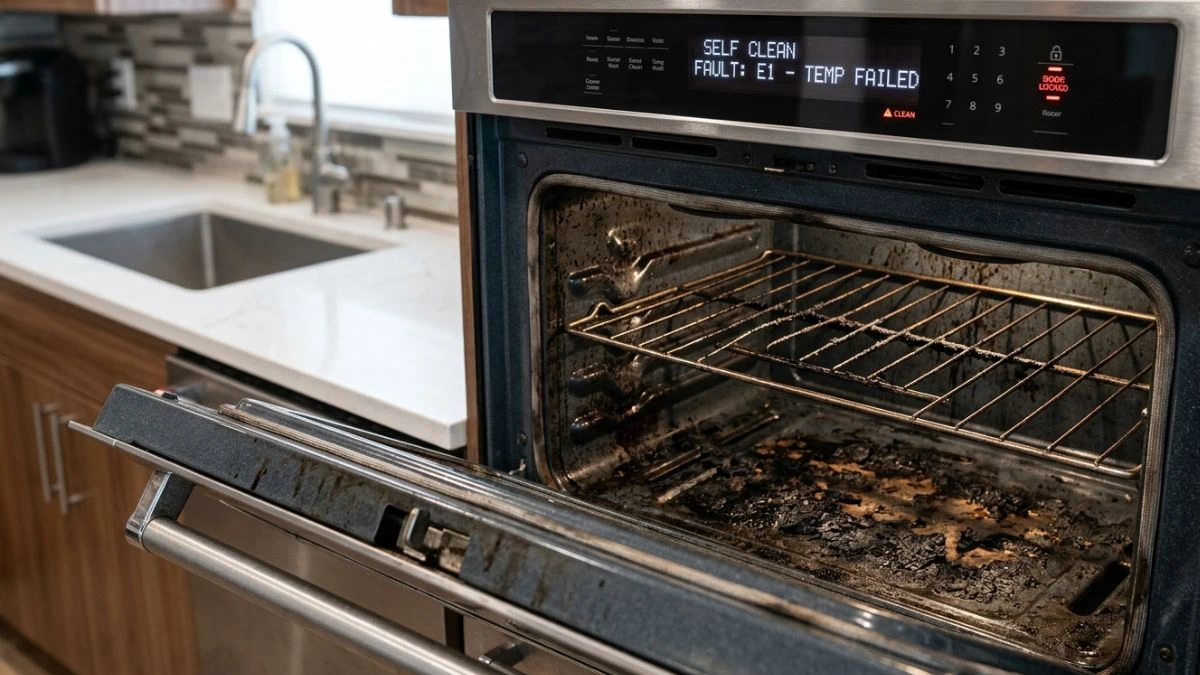
Is your KitchenAid oven’s self-clean feature causing more trouble than help? You’re not alone.
Many users find themselves stuck with problems like error codes, smoke, or the cycle not starting at all. These issues can be frustrating, especially when you expect a hassle-free cleaning experience. But don’t worry—understanding why these problems happen and how to fix them can save you time, money, and stress.
Common Self-clean Issues
KitchenAid ovens are popular for their self-clean feature, which helps remove tough grease and food spills. Despite its convenience, many users face common self-clean issues that interrupt the cleaning cycle or reduce its effectiveness. These problems often cause frustration and may require troubleshooting or repairs. Understanding these issues can help owners maintain their ovens better and avoid long-term damage.
Cycle Not Starting
One frequent problem is the self-clean cycle not starting at all. This issue can happen due to several reasons. First, the oven might not detect the door is properly closed and locked. The self-clean feature only starts when the door lock engages fully for safety.
Other causes include:
- Power supply issues: A blown fuse or tripped circuit breaker can cut power to the oven.
- Control board faults: The electronic control board may fail or have a glitch.
- Incorrect settings: The user might not select the self-clean option correctly on the control panel.
Troubleshooting steps for cycle not starting:
- Check the door is fully closed and locked.
- Ensure the oven has power; check fuses and breakers.
- Reset the oven by unplugging it for a few minutes.
- Verify the cleaning cycle is correctly set on the control panel.
- If problems persist, the control board may need inspection.
Error Codes
KitchenAid ovens display error codes to signal problems during the self-clean cycle. These codes help identify specific faults quickly. Common error codes related to self-clean include:
| Error Code | Meaning | Suggested Action |
| F1 | Keypad or control board issue | Reset oven; if continues, call technician |
| F3 | Temperature sensor failure | Check sensor wiring; replace sensor if faulty |
| F5 | Door lock failure | Inspect door lock assembly; replace if needed |
These error codes appear on the oven display. Users should note the code and follow the manual’s instructions. Resetting the oven may clear some errors. Persistent codes suggest hardware repair.
Door Lock Problems
The door lock system is critical during self-cleaning. It prevents opening during high heat. Many KitchenAid ovens face door lock problems such as:
- The door does not lock properly.
- The lock remains engaged after cleaning.
- The lock sensor gives false readings.
Common causes of door lock issues include:
- Worn or broken door latch mechanisms.
- Faulty door lock motor or solenoid.
- Problems with the door lock switch or sensor.
Symptoms of door lock problems:
- Oven shows “door locked” but door is open.
- Self-clean cycle won’t start due to door lock error.
- Door lock won’t release after cleaning ends.
Fixes involve inspecting the lock parts for damage or debris. Replacing worn components often solves the problem. Testing the lock switch with a multimeter can confirm electrical faults. Avoid forcing the door open during a locked cycle; it risks injury and oven damage.
Incomplete Cleaning
Some users report that the self-clean cycle ends without fully cleaning the oven. The inside may still have grease or burnt residue. Causes of incomplete cleaning include:
- Insufficient cleaning time set by the user.
- Oven temperature not reaching the required high heat.
- Blocked air vents reducing heat circulation.
- Heavily soiled ovens needing multiple clean cycles.
Tips to improve cleaning results:
- Choose the appropriate cleaning duration based on soil level.
- Remove large food debris before starting the cycle.
- Check that oven vents are clear for proper airflow.
- Run a second self-clean cycle if necessary.
Regular cleaning prevents heavy build-up, making the self-clean feature more effective. If the oven consistently fails to reach the cleaning temperature, the heating elements or temperature sensor might need servicing.
Causes Of Self-clean Failures

The self-clean feature in KitchenAid ovens helps burn off food spills and grease inside the oven. This feature saves time and effort in manual cleaning. But sometimes, the self-clean mode fails to start or stops unexpectedly. These problems cause frustration and may harm the oven if not fixed.
Electrical Issues
Electrical problems are a common reason for self-clean failures in KitchenAid ovens. The self-clean cycle uses high heat, which requires stable and strong electrical power. If the oven does not get the right power, the clean mode might not start or may stop suddenly.
Common electrical issues include:
- Blown fuses or tripped circuit breakers
- Faulty wiring or loose connections
- Damaged heating elements
- Power surges or voltage drops
Sensor Malfunctions
KitchenAid ovens use sensors to monitor temperature and safety during the self-clean process. These sensors send signals to the control board to keep the oven running safely. If a sensor fails, the oven may stop the self-clean cycle or not start it at all.
Key sensors involved include:
- Temperature sensors
- Door lock sensors
- Thermocouples
Common symptoms of sensor failure:
- Oven displays error codes
- Self-clean cycle stops mid-way
- Door stays locked or won’t lock
Faulty sensors can cause safety risks. The oven may overheat or stay locked too long.
How to detect sensor problems:
- Look for unusual error messages on the display
- Notice if the oven door behaves oddly during cleaning
- Check if the oven heats unevenly or not at all
Door Latch Defects
The self-clean mode requires the oven door to be securely locked. This protects users from high heat and prevents accidents. A defective door latch can stop the self-clean cycle from starting or cause it to stop suddenly.
Common door latch issues include:
- Broken latch mechanism
- Misaligned latch parts
- Worn-out door lock sensor
Signs of door latch problems:
- Oven shows door lock error
- Door won’t lock or unlock properly
- Self-clean cycle fails to begin
Here is a simple checklist to inspect the door latch:
- Check if the door closes firmly
- Listen for the latch clicking sound
- Look for visible damage or wear
Fixing or replacing the door latch can restore the self-clean function quickly.
Software Glitches
Modern KitchenAid ovens rely on software to control the self-clean process. Sometimes, the oven’s software can have bugs or glitches. These software problems may cause the oven to freeze, display wrong messages, or stop cleaning early.
Common software issues include:
- Firmware bugs from updates
- Corrupted control board memory
- Errors caused by power interruptions
Signs of software glitches:
- Oven screen freezes or resets
- Self-clean cycle restarts or cancels itself
- Unusual error codes without hardware issues
Possible solutions:
- Reset the oven by unplugging it for a few minutes
- Check for firmware updates from KitchenAid
- Contact a technician for control board inspection
Troubleshooting Tips
Many Kitchenaid oven owners face issues with the self-cleaning function. These problems can stop the cycle or cause errors. Simple fixes often solve these troubles. Below are key troubleshooting tips to help identify and fix common self-clean problems.
Resetting The Oven
Resetting the oven can clear minor glitches. This step often resolves self-clean errors caused by software hiccups or temporary faults. Follow these steps to reset your Kitchenaid oven safely:
- Turn off the oven and unplug it from the power source.
- Wait for at least 5 minutes to let the system reset.
- Plug the oven back in and turn it on.
- Try starting the self-clean cycle again.
If the oven has a control panel reset button, use it according to the user manual. Some models may need a specific button sequence for reset. Check your oven’s guide for exact instructions.
| Step | Action | Purpose |
| 1 | Unplug oven | Cut power to reset control board |
| 2 | Wait 5 minutes | Allow capacitors to discharge |
| 3 | Plug in and power on | Restart oven system |
| 4 | Start self-clean cycle | Test if issue is fixed |
Note: If the oven still fails after resetting, try other troubleshooting steps below.
Checking The Door Lock
The self-clean cycle requires the door to lock tightly. A faulty door lock prevents the oven from starting or causes it to stop mid-cycle. Inspect the door lock carefully:
- Visually check the door latch for any damage or dirt.
- Listen for a click sound when the door closes. No sound may mean a broken lock.
- Manually test the latch by gently closing and opening the door. It should hold firmly.
- Examine the door lock switch inside the oven frame for signs of wear.
Common door lock issues include:
- Broken or bent latch
- Failed door lock switch
- Dirt or grease buildup blocking latch
Cleaning the latch area with mild soap and water can help. Replace damaged parts to ensure proper locking. Below is a simple checklist for door lock inspection:
| Inspection Step | Action | Status |
| Latch Condition | Check for damage or bending | OK / Replace |
| Lock Switch | Test electrical continuity with a multimeter | OK / Replace |
| Cleanliness | Remove dirt and grease | Clean / Re-clean |
| Latch Operation | Close door and listen for click | Click / No Click |
Inspecting Wiring And Sensors
Wiring and sensors control many functions during self-cleaning. Faulty wiring or bad sensors cause errors or shutdowns. Follow these tips for inspection:
- Unplug the oven before inspecting wiring to avoid electric shock.
- Look for loose, burnt, or broken wires near the control board and heating elements.
- Check sensor connections for corrosion or disconnection.
- Use a multimeter to test sensor resistance and wiring continuity.
Common sensors to inspect include:
| Sensor | Function | Common Issue |
| Temperature Sensor | Measures oven heat | Open circuit or short |
| Door Lock Sensor | Confirms door is locked | Faulty switch or wiring |
| Control Board Wiring | Connects sensors to control | Loose or damaged wires |
Replacing damaged wiring or sensors often restores proper self-clean function. Maintain good connections and clean contacts regularly.
Running Diagnostic Tests
Most Kitchenaid ovens have built-in diagnostic modes. These tests help find errors causing self-clean failures. To run diagnostics:
- Turn the oven off.
- Press and hold specific buttons on the control panel (check your manual for exact keys).
- Release buttons when the display shows test mode.
- Follow on-screen prompts to check different components.
Diagnostic tests can identify:
- Door lock faults
- Sensor errors
- Heating element problems
- Control board issues
Use the error codes from diagnostics to guide repairs or technician help. Record codes and details for reference.
Example Diagnostic Codes Table:
| Error Code | Possible Cause | Suggested Action |
| F1 E1 | Temperature sensor failure | Test sensor resistance, replace if faulty |
| F3 E2 | Door lock error | Check door lock switch and wiring |
| F4 E3 | Heating element issue | Inspect and test heating element |
Maintenance To Prevent Problems

Proper maintenance helps reduce KitchenAid oven self-clean problems. Routine care keeps your oven working well and stops common issues. Taking simple steps prevents damage during the self-clean cycle. It also improves oven lifespan and performance. This section explains key maintenance tips to avoid problems and keep your oven safe and efficient.
Regular Cleaning Practices
Regular cleaning outside the self-clean cycle helps avoid buildup that causes problems. Wipe spills and crumbs after every use. This prevents heavy residue that can smoke or burn during cleaning.
- Use mild soap and water to clean the oven interior when cool.
- Remove racks and clean separately with warm water and soap.
- Check door seals for food crumbs or grease and wipe clean.
Do not use harsh chemicals or abrasive scrubbers. These can damage the oven surface and sensors. Regular cleaning reduces the self-clean cycle length and heat needed. This lowers the risk of error codes and overheating.
| Cleaning Task | Frequency | Tools Needed |
| Wipe oven interior | After each use | Soft cloth, mild soap, water |
| Clean oven racks | Monthly | Warm water, dish soap, sponge |
| Check door seals | Weekly | Soft cloth |
Avoiding Oven Overloads
Overloading the oven can cause self-clean errors and damage. Heavy or large items block heat circulation. This creates uneven temperatures and stresses oven parts.
Follow these tips to avoid overloads:
- Do not place multiple racks or trays during self-clean.
- Remove cookware and utensils before starting the cleaning cycle.
- Do not use the oven for storage of pots, pans, or food.
- Keep oven interior clear to allow proper heat flow.
Overloads increase cleaning time and energy use. They may trigger fault codes or cause the oven to shut down for safety. Protect your oven by keeping the interior free from clutter.
Updating Firmware
Firmware controls oven functions and safety features. Outdated firmware can cause self-clean errors or poor performance. Check for updates regularly to keep your oven running smoothly.
Steps for firmware updates:
- Connect your oven to Wi-Fi if it supports smart features.
- Open KitchenAid app or visit the official website.
- Check for firmware updates under the support or settings section.
- Follow on-screen instructions to download and install updates.
Updated firmware often fixes bugs and improves self-clean reliability. It can add new safety checks and optimize cleaning cycles. Keep your oven firmware current to avoid avoidable problems and improve efficiency.
Proper Ventilation
Good ventilation is vital during the self-clean cycle. The oven reaches high temperatures that produce smoke and odors. Proper airflow prevents overheating and damage to components.
Ensure proper ventilation by:
- Using an exhaust fan or range hood to remove smoke.
- Keeping kitchen windows open for fresh air circulation.
- Not blocking vents on the oven or nearby walls.
- Allowing space around the oven for heat dissipation.
Poor ventilation can cause error codes or trigger safety shutdowns. It also increases wear on oven parts. Maintain airflow to keep your KitchenAid oven safe and operating well during self-clean.
You May Like Also: How to Modify Wall Oven Cabinet
Conclusion
Kitchenaid oven self-clean problems can be frustrating to fix. Small steps often solve common issues. Always check the door lock and power supply first. Clean the oven regularly to avoid heavy buildup. Follow the user manual for safe cleaning. If problems continue, contact a professional technician.
Taking care of your oven helps it last longer. A well-maintained oven keeps your kitchen running smoothly. Simple care makes a big difference over time. Keep your cooking safe and easy every day.


